
VLANs
VLANs allow a switch to be divided into multiple parts.
- Enhanced security, management, lower costs.
- Limits broadcast domain > better performance.
There are two ways to create a VLAN:
vlan 10Create VLAN 10.
int f0/1switchport access vlan 10% Access VLAN does not exist. Creating vlan 10The f0/1 interface now has access to VLAN 10.
The no prefix allows you to delete a VLAN:
no vlan 10Spanning-tree
The spanning-tree prevents broadcast loops and assigns a path cost and priority to each VLAN.
It organizes an election based on each device’s BIDs (bridge ID) and MAC addresses.
Note
The lower the value, the higher the chance of the switch being elected as the “root bridge.”
Tip
The root bridge must be traversed to exit the local network.
You can set the priority of a VLAN:
spanning-tree vlan 10 priority 8000% Bridge Priority must be in increments of 4096.% Allowed values are:0 4096 8192 12288 16384 20480 24576 2867232768 36864 40960 45056 49152 53248 57344 61440Note
The BID must be one of the values listed above (power of 2).
- You can force a VLAN to use a specific “root bridge,” regardless of BID:
spanning-tree vlan 10 root primary- If the root bridge fails, a backup can take over:
spanning-tree vlan 10 root secondaryTrunk
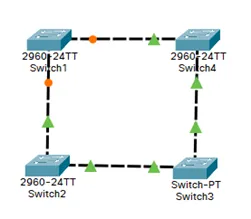
The trunk allows one or more VLANs to be transmitted between multiple devices.
It effectively adds more ports to the primary switch.
| Physical View | Logical View |
|---|---|
 |  |
To configure a trunk link, configure the interface (the port) with these commands:
int f0/1switchport mode trunkTip
If the configured devices are recent, the device on the other side of the trunk link can detect this link and configure itself automatically.
EtherChannel/PortChannel
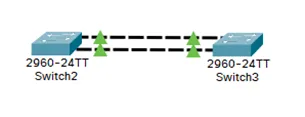
EtherChannel enables link aggregation (up to 8 links).
This increases bandwidth and provides redundancy/fault tolerance.
- Select the interface range:
int range f0/1-2- Create EtherChannel link #1 on the interfaces:
channel-group 1 mode onHere, “mode on” indicates manual mode.
You need to repeat these commands on the second switch.
Tip
Both physical links are treated as a single logical link: EtherChannel #1.
Dot1Q Encapsulation
Encapsulation allows multiple VLANs to be routed over a single physical link.
The router tags frames to identify VLANs.
To do this, “sub-interfaces” need to be created.
int g0/0/0.10- Encapsulate frames for VLAN 10, according to IEEE 802.1Q standard.
encapsulation dot1Q 10- Define the IP address of the LAN interface for the specified VLAN.
ip address 192.168.10.1 255.255.255.0- 192.168.10.1 is the gateway for devices on VLAN 10.
Warning
Don’t forget to enable the physical interface: g0/0/0
Tip
If you have multiple VLANs to configure, the commands are the same.
Just adapt them for your configuration.
Example of configuring Dot1Q encapsulation for VLAN 20:
int g0/0/0.20encapsulation dot1Q 20ip address 192.168.20.1 255.255.255.0Warning
Don’t forget to enable the physical interface: g0/0/0
Dot1Q Command Summary
Copy/paste these lines (adapting to your configuration) into your terminal:
conf tint g0/0/0.10encapsulation dot1Q 10ip address 192.168.10.1 255.255.255.0no shut